Video Cliping Product User Manual home page
Search...
⌘K
Help & Support
Search...
Navigation
Editor
Delete the unwanted parts of the slice
Help Center
Getting Started
General FAQ
Subscriptions
How do the pricing plans work?
How can I change or cancel my subscription?
What does the free plan of Gmax offer?
Does Gmax support a one-month subscription?
How can you upgrade or downgrade your plan?
Projects
Upload
Export
Editor
How to Enter the editing page
Delete the unwanted parts of the slice
Add a new slice at the beginning, end, or a specified position
Modify the title content
Modify the subtitle content
Change the style of the title/subtitle
Change the background color of the video
Add custom materials
Add a music background
Reclip
Publish
How to Connect Your Social Media Accounts
How to Schedule Using the Calendar
Account
Why can't I sign up?
How to Change the Email
Editor
Delete the unwanted parts of the slice
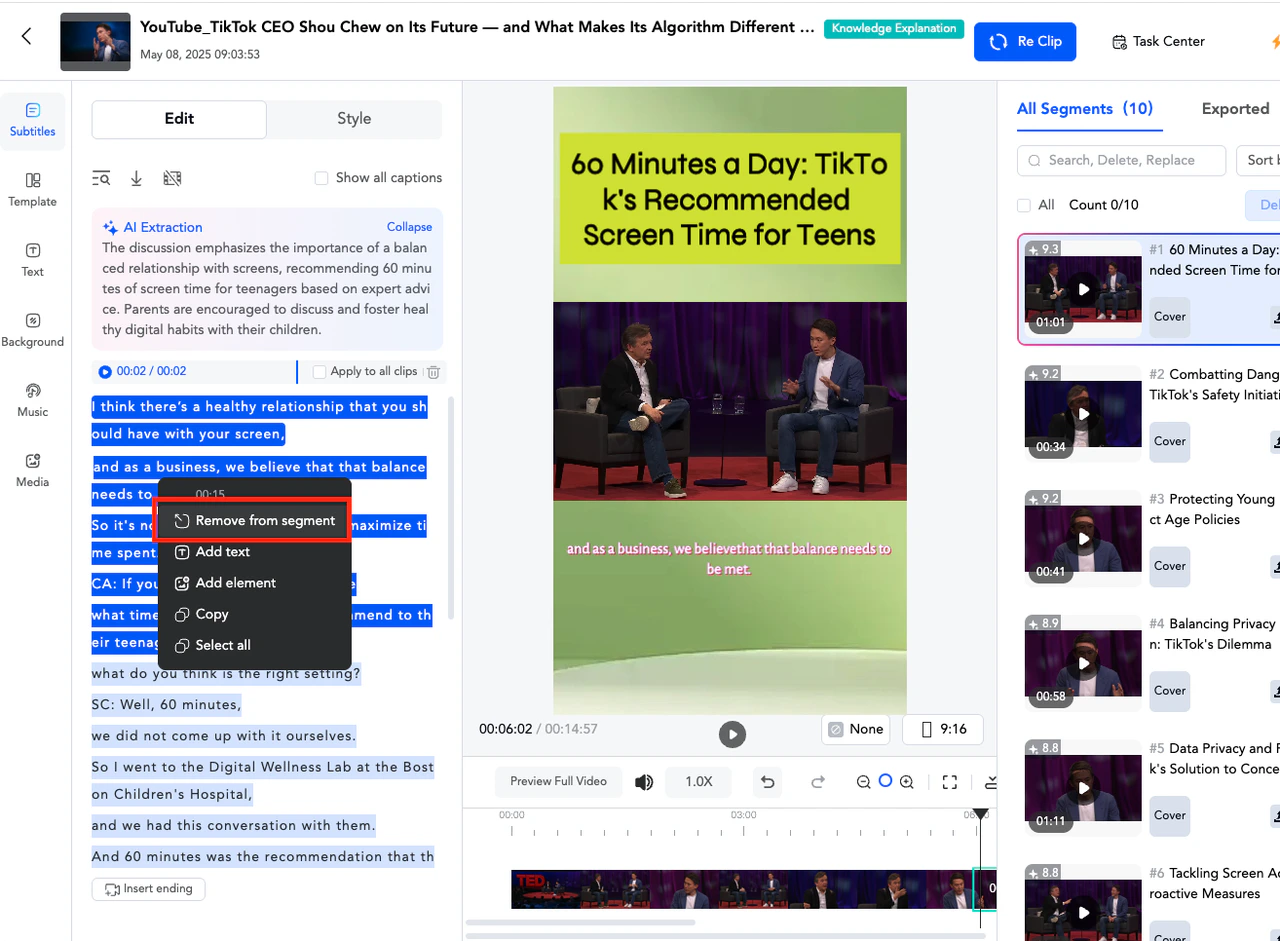
You can delete the segments you want to remove according to the extracted and converted subtitles of the video. Select the unwanted subtitle text, then click “Remove from segment”.
How to Enter the editing page
Add a new slice at the beginning, end, or a specified position
⌘I